

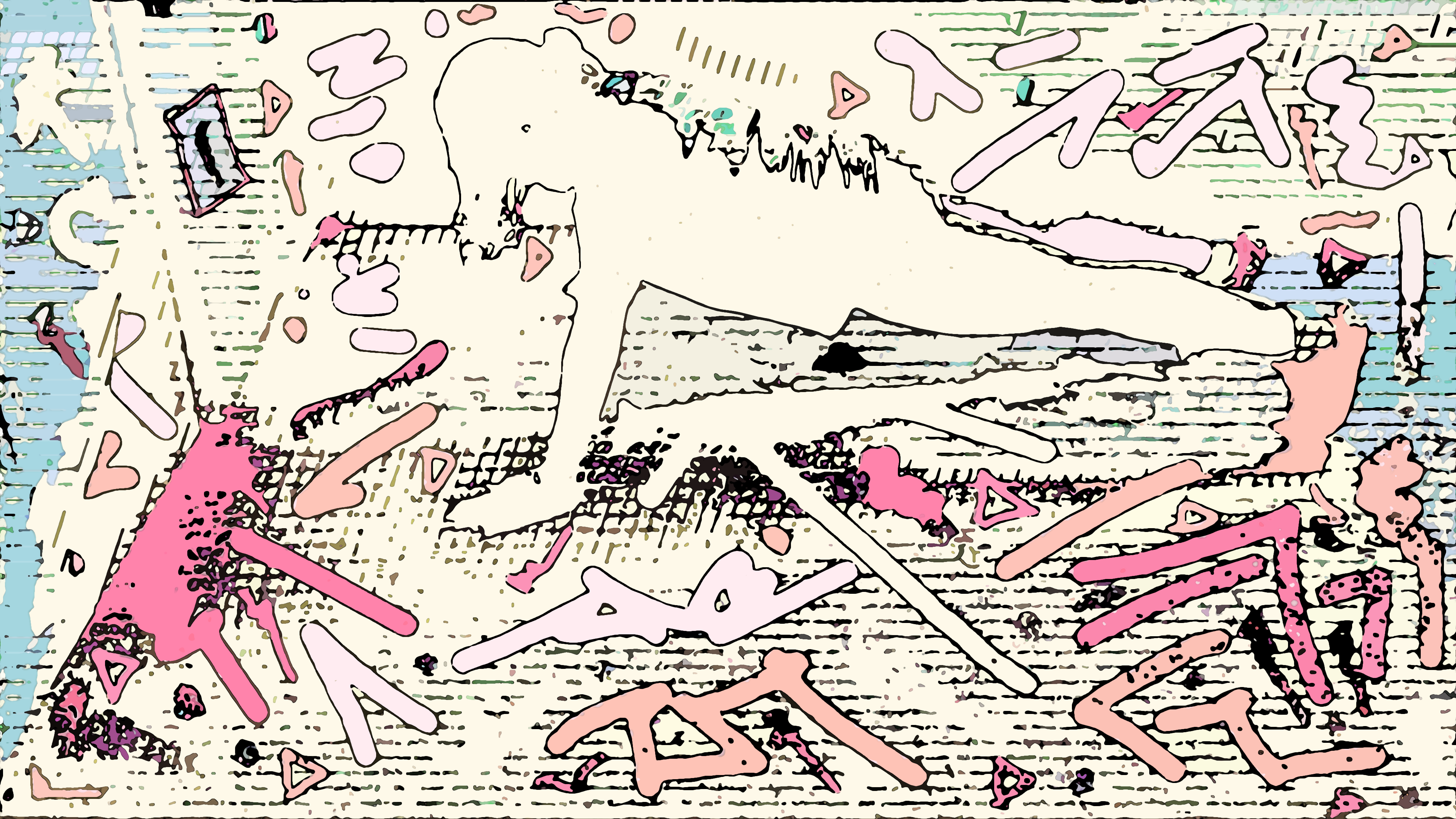
Training day for a wannabe stair climber…
Scene: Katherine (Moi/Me🖤) does 10 sets of pushups with planks in my bedroom. This was the first part of my workout session for 7/29/26. Each set is 10 pushups with about 20 to 30 seconds in planks right after. The last set I did 20 pushups. Video is speed up by around 0.5x.
For the planks, I count to 30 in French and depending on how fast or slow I go, is the amount of seconds I do in planks. Small detail: You can see my mouth moving while doing planks.
Oh, and it may appear it’s more than 110 pushups because I typically don’t count the first pushup as a real pushup because of form and easing into it. It’s like a warmup pushup. After that, I did 600 mountain climbers, 20 side kicks, and 20 knee to elbow strikes (not filmed). My main focus is climbing steps but that day I was targeting the upper body. I trained for a stair climbing event in March and it changed my workout routine in the best of ways. I mentioned the event briefly during that time on this mix. I would totally love to do another stair climbing event in the future but not sure if I can. It was a life changing experience that’s for sure!
The original video is 20 minutes. 20:05 to be exact. As mentioned above, the video is sped up a little bit and between sets 6 to 7, I took a very short break, less than 30 seconds. This lead to me being really tired after set 7 so I took an extended break of over 2 minutes, under 3. I cut that break down. There were two other breaks over a minute but under 2 minutes and I reduced that as well. I tried to keep the breaks (Rest) under a minute. The only editing I did to the live video were the rest points and the stretch I did which made the design black out on the screen. Everything else is live at the time. I’m working on my pushup count. Currently, I do 50 per workout session. Sometimes more, depending on my mood. I was going to just do 50 but I thought the video would be super short so I aimed for 100 instead. The last set, I wanted to do extra at the time to end the video on a high and did 20 pushups instead of 10.
Making the Video
Oh boy… Where I do I start with this one?! Lol… I had twice as much problems making this video than the last one. The funny part is that I gave myself a strict three design fail rule. When I ran into an issue on design three, I was livid. I could have fixed it but I was just done and wasn’t too happy with what I made and just deleted the script. However… I wanted to do this video and I was determined to make something. I took a break and started over again. This time, no errors until the very end! For some reason when I saved the file the script saved it wrong. I had to go back and fix it by untoggling a save point and deleting a variation I saved and it was somehow part of the error. The thumbnail image is for a design that I made an error on and I don’t know what happened there either. I’m sure for one of the designs, I hit undo out of habit while blending. It’s like that saying goes, old habits die hard.
Making this video was a nightmare. I was running into to small issues with the script/actions. Small issues that was setting me back. If I put the wrong number in the script, I would have to start over. I made every mistake you can think of when batching my artwork on the images/frames. However, if I wasn’t able to batch my work then I would be still adding my designs to the frames to this day.
To put things in perspective: For the last music video, I placed my design on 1500 images. It took me 17 days to do that manually. Using the script and having to press a few buttons to start the script, and save all the files. Not hard. But I would have to be watching the screen for when the script stopped to save the file. Now… when batching, the script is able to save itself according to the starting serial number and only if I click on “Override Action “Save As” Commands”. So when I batch, it will save each image in my play folder into my destination folder according to the serial number. And that’s only if the serial number is the same number in the play folder. I made several mistakes along the way where I added the wrong number and it messed up the whole sequence! But… I am so grateful for this option in Photoshop. It speeds up the progress tenfold. To end perspective: It took me 16 days to place my design on 7,933 images when batching in Photoshop. I mean… that’s 5x more images in less time! It’s incredible! I wish I knew about this sooner.
I’ll go into some detail here on the process just in case you haven’t seen this video. I create a video. This time of me doing pushups and planks. I used an app to convert the video (frames) into images. I used one of those images to make a design. I record every step I take using actions in Photoshop. I reapply my design to every image from the video I converted using the script/action sequence I created in Photoshop. Then… I go into After Effects, create an JPG/PNG sequence from those photos to reassemble the video again but this time it has my design on it. And then I edit the video from there by changing the speed (time stretch), adding my music, and my intro.
Further detail, since I don’t have much ram on my computer, I can’t batch 7933 images in one go. I could only do batches of 25 or 24 if I had the internet up in the background at a time. Also, I had to cut this video because there was a part where I was stretching and the screen went completely black. You can tell at 6:55 in the video. I started stretching but then it cuts to the rest part. I was stretching for a little bit there. I love stretching in between sets. All other parts in the video you can actually see me leaving the room.
Speaking of the Rest Part…
I had my phone still recording during the rest part. I added the word “REST” while batching my images. For the main design that you see when I’m doing pushups the color is different. I made two color variations of the original design at the time of live recording. Thank goodness I did because the main version goes completely black during the rest period and when I added REST to it, the design changes to a different color that was not pleasing to see. So I had to create separate folders just for the rest period and change the script a little when batching so it can save the design as the alternate color variation I created instead of the main version. If I don’t change the script, the batch would continue to save in the main version. A nightmare, yes? Since the design is literally reacting to the image (video frame) then I don’t know how it looks until after the batch is completed.
I made the design using a frame (115) with me doing a pushup. Best way to describe it is the frame itself is my canvas. I made my weird shapes around my body and in the room. The “K/C” is on the wall next to my closet door, lol. Kind of looks like I took a can of spray paint and put graffiti all over my bedroom. 🎨😆
I know I’m just a shadow here but that’s what makes art so wonderful. I can distort reality with color. It’s amazing to do this since the design itself was static when being made. Every frame reacts to design and I just love that the art feels alive with that effect.
The doors are open for sure when it comes to making more of these videos. Though, every time has been a battle in Photoshop. Everything takes so much time. I wish I had more time.
Using my favorite songs from previous mixes for this weekly mix. I was going to loop it to make a full video but… I didn’t want the video to look like I was doing pushups forever. I wanted to keep it a live recording with my design as a video effect so to speak, lol. This is the goal… to distort current reality with my color blends. If you read all of this, thanks… ❤️🤗
Katherine…
- Video made by moi: Katherine B. (KATCLUSE)
- Art made in the video was created by moi.
- (Moi is “me” in French ❤️)

 No products in the cart.